
Fix my grammar. Right-click any text.
Gramai is a browser extension for Chrome and Firefox, with apps for Mac and Windows. Select a sentence anywhere you type. An email, a comment, a post. Then right-click and pick Gramai. The fix lands right where the text was. No setup, no API key, and the first 10 actions are free.
 Add to Chrome
 Add to Firefox
Free to try, no account. Have a look at the plans: 10 actions free, then $2.99 a month.
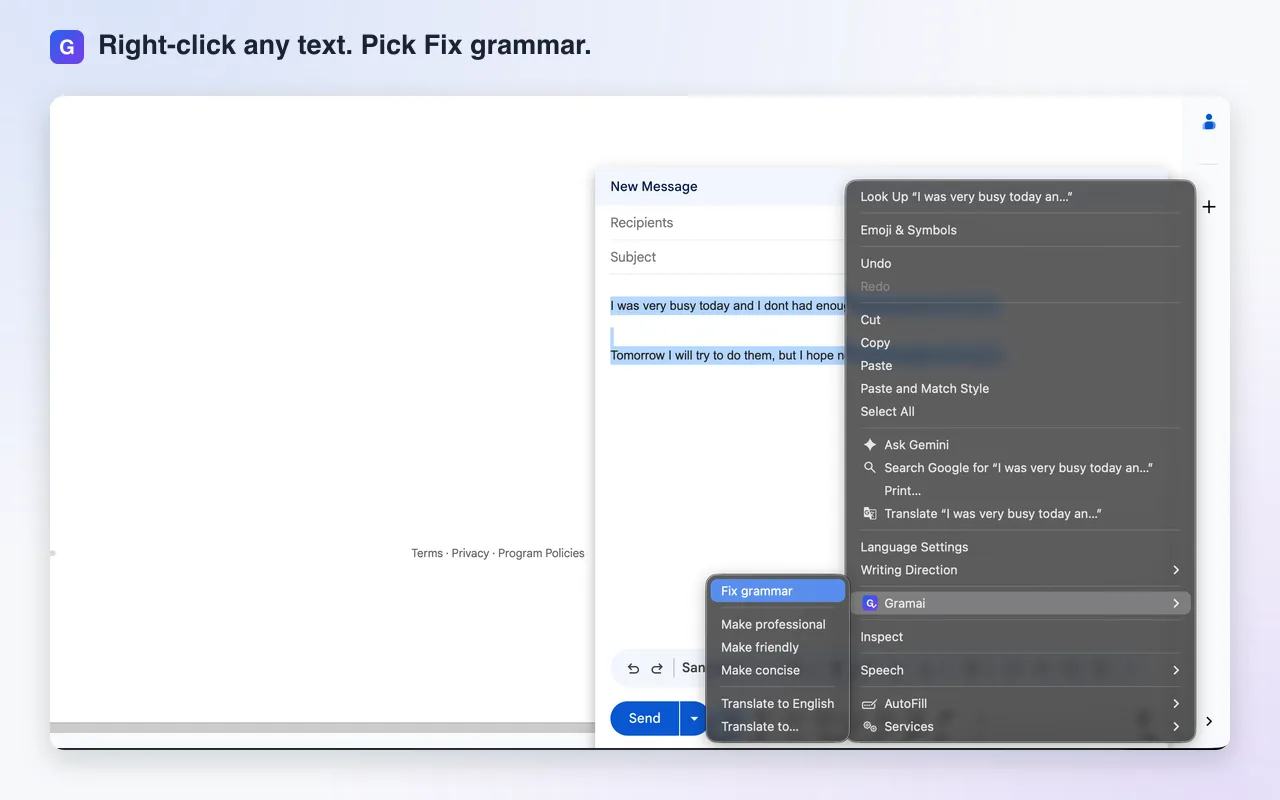
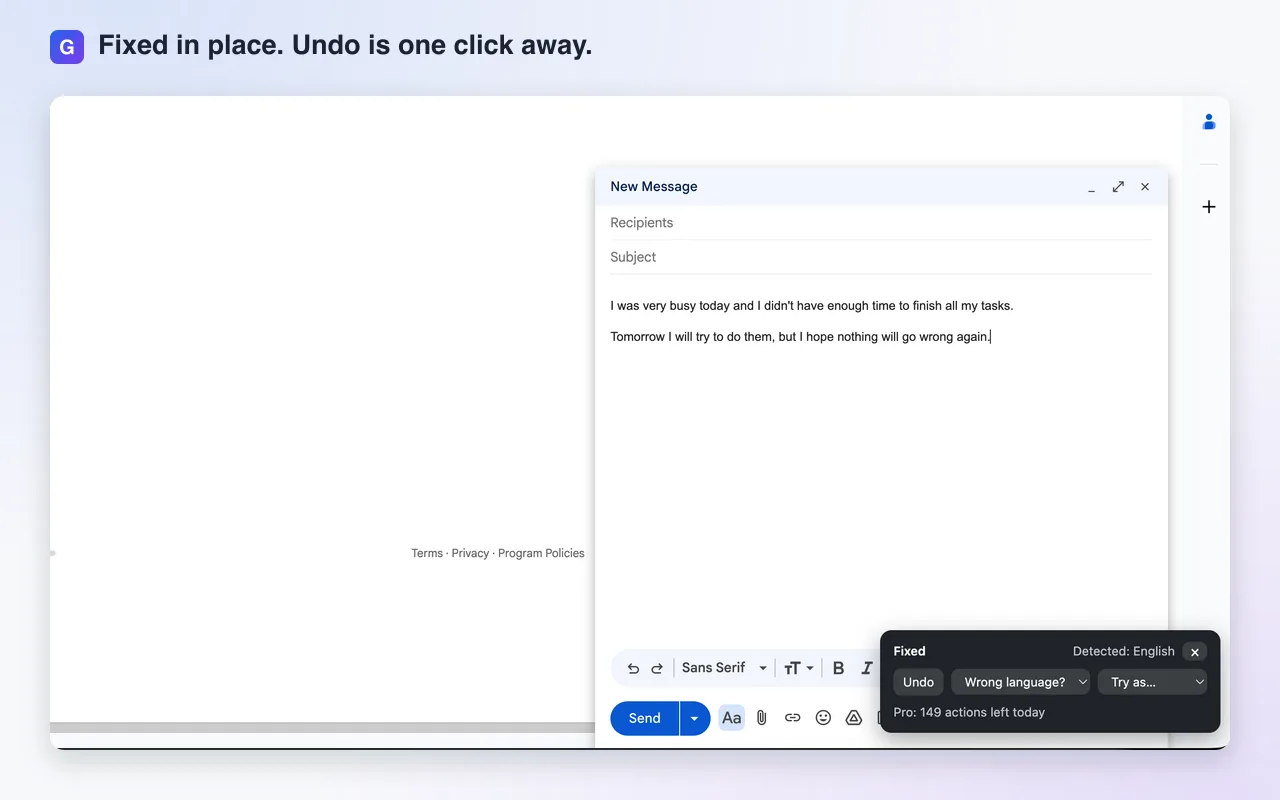
Demo: a sentence with a few mistakes is selected, Gramai's Fix grammar is chosen from the right-click menu, and the corrected sentence replaces it in place.
How it works
-
Select some text
Highlight a sentence or a paragraph in any editable field, or on any page.
-
Right-click, choose Gramai
Pick Fix grammar, or Make professional, friendly or concise, or Translate into any of 30+ languages. Every plan gets every action.
-
The fix lands in place
In an editable field the correction goes straight in. Anywhere else, a small panel turns up with a Copy button.
What it looks like in Gmail
Works where you write
Gmail, LinkedIn, X, Reddit, Notion, plain text fields. Anywhere you can select text and right-click, really. The how-to guide walks through each one.
- Gmail
- X
- Notion
- Plain text fields
Nothing to set up
Install it and right-click. There's no account to make, no API key to find, no model to choose. Every installation gets 10 actions to try. After that, Basic is $2.99 a month for 50 actions a day, and Pro is $5.99 for 150. See the plans.
Already have an API key?
Then Own key is for you. It's a single $4.99 payment. Pick your provider, paste your key, and Gramai calls it directly. Actions are unlimited, the provider bills you, and nothing goes through our server.
- OpenAI
- Anthropic
- Google Gemini
- DeepSeek
- Qwen (Alibaba Cloud)
- Kimi (Moonshot)
- GLM (Z.ai)
- MiniMax
- Custom (OpenAI-compatible)
The privacy promise
-
Your text is never stored
On Free, Basic and Pro your selection passes through our server to the AI model and back. We never store it and we never log it.
-
Own key skips us
On Own key your text goes straight from your browser to the provider you picked. We never see it at all.
-
No tracking
No accounts, no tracking scripts, and no logs of what you write. The full details are on the privacy page.
Questions people ask
What is Gramai?
Gramai fixes grammar and rewrites the text you select. It is a browser extension for Chrome and Firefox, with apps for Mac and Windows. You highlight a sentence in any text field, right-click, pick an action, and the result replaces the selection. There is no account, no setup and no API key.
Is Gramai free?
Every installation gets 10 free actions to try, with no card and no account. After that, Basic is $2.99 a month for 50 actions a day, Pro is $5.99 a month for 150 actions a day, and Own key is a single $4.99 payment for people who bring their own API key.
Is Gramai an alternative to Grammarly?
For fixing and rewriting what you have already written, yes. Gramai does not underline mistakes while you type. It works on demand: select the text, right-click, and get the corrected version in place. It is cheaper, has no account, and stores nothing.
How is Gramai different from Grammarly?
Grammarly reads along as you type and underlines suggestions. Gramai stays quiet until you select text and right-click, and the two are set side by side on the comparison page.
Which languages does Gramai support?
Fix grammar, Make professional, Make friendly and Make concise work in the language of the selected text, which is detected automatically. Translate turns the selection into any of 30+ languages, with a default target you pick in the settings.
Where does Gramai work?
In any editable field on any website: Gmail, Outlook web, LinkedIn, X, Reddit, Notion, Slack web, forums, comment boxes and plain text fields. On read-only pages it shows the result in a small panel with a Copy button. Google Docs is the one known exception, because it draws text on a canvas.
What happens to my text?
The selected text is sent to the AI provider only when you run an action and is never stored or logged. On Free, Basic and Pro that provider is OpenAI, through Gramai's own server. On Own key the extension calls your provider directly and nothing goes through us.