
Gramai for Windows
The same fix, outside the browser. Select text in Outlook, Word, Slack, Notepad or any other app, press the shortcut or click the small Gramai button that appears, and the corrected text replaces the selection where it stood.
Windows 10 or 11, 64-bit. Installs for your account only, no administrator needed. Free to try with 10 actions, no account. Then $2.99 a month, or your own API key.
Install in a minute
-
Run the installer
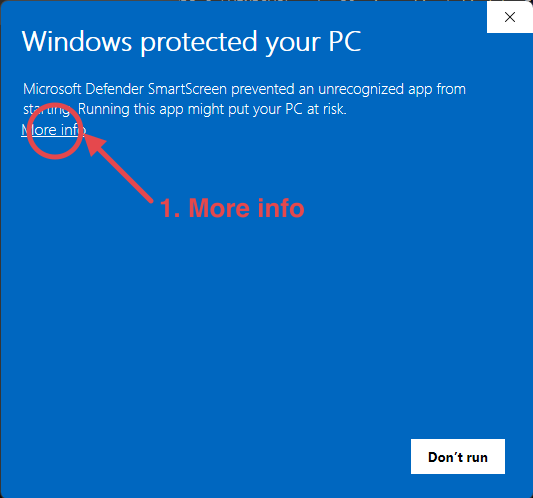
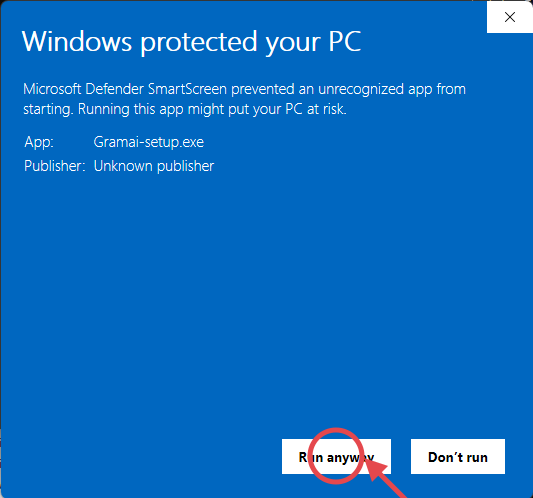
Open Gramai-setup.exe. It installs for your account in a few seconds, without asking for an administrator. Windows shows a blue warning the first time, because the installer is new to it: click More info, then Run anyway. Two clicks, shown here:
-
Find it in the tray
Gramai lives in the system tray, next to the clock. Windows first puts it among the hidden icons behind the small arrow; drag it out to keep it in sight. Double click it for the settings.
-
Select text, fix it
Select a sentence anywhere and press Ctrl+Shift+G for Fix grammar, or click the Gramai button that appears next to the selection to pick an action. Copy twice (Ctrl+C Ctrl+C) opens the same menu in apps where the button cannot show.
What it does, and does not
Fix grammar, Make professional, Make friendly, Make concise and Translate, the same five actions as the extension, in every app that lets you copy and paste text. The result keeps your wording and replaces only what was wrong. Undo is one click on the toast, or Ctrl+Z in your app.
Formatting inside the replaced text (bold, links) is lost, because the result goes in as plain text. Password fields, terminals, code editors and apps you add to the quiet list are left alone. Apps you run as administrator are out of reach: Gramai cannot read a selection there unless it runs as administrator too.
Everything the privacy policy says applies here too, with a section of its own for the Windows app.
Questions people ask
Does Gramai need a permission on Windows?
No. Windows lets an app you installed read the text you selected in another app and put the result back, so there is nothing to turn on. Gramai reads nothing until you select text and ask for an action.
Why does Windows say “Windows protected your PC”?
The installer comes from KROX GROUP DOO, the company behind Gramai. It is not yet signed with a Windows code signing certificate, so SmartScreen calls it an unrecognized app the first time. Click More info, then Run anyway, to continue; the pictures above show exactly where. Updates install from inside Gramai and never ask again.
Does the Windows app share a plan with the browser extension?
Yes. One license key works on up to three devices, and the Windows app counts as one. The Free plan's 10 actions are per installation, so the app has its own ten.
Where does my text go?
Only the text you selected, and only when you ask for an action. It goes to Gramai's server and on to the AI provider, or straight to your own provider on Own key, and it is never stored. The privacy policy has a section for the Windows app.
How do I uninstall it?
Open Settings, then Apps, find Gramai in the list and choose Uninstall. Your license stays with your key, so you can install it again later.